Client build · In delivery

For a US outdoor-products brand on Amazon · SP-API · n8n · Supabase · React · Netlify

The Seller Dashboard.

One screen that tells an Amazon seller what needs doing this morning, and what to ship before the season peak, not after it.
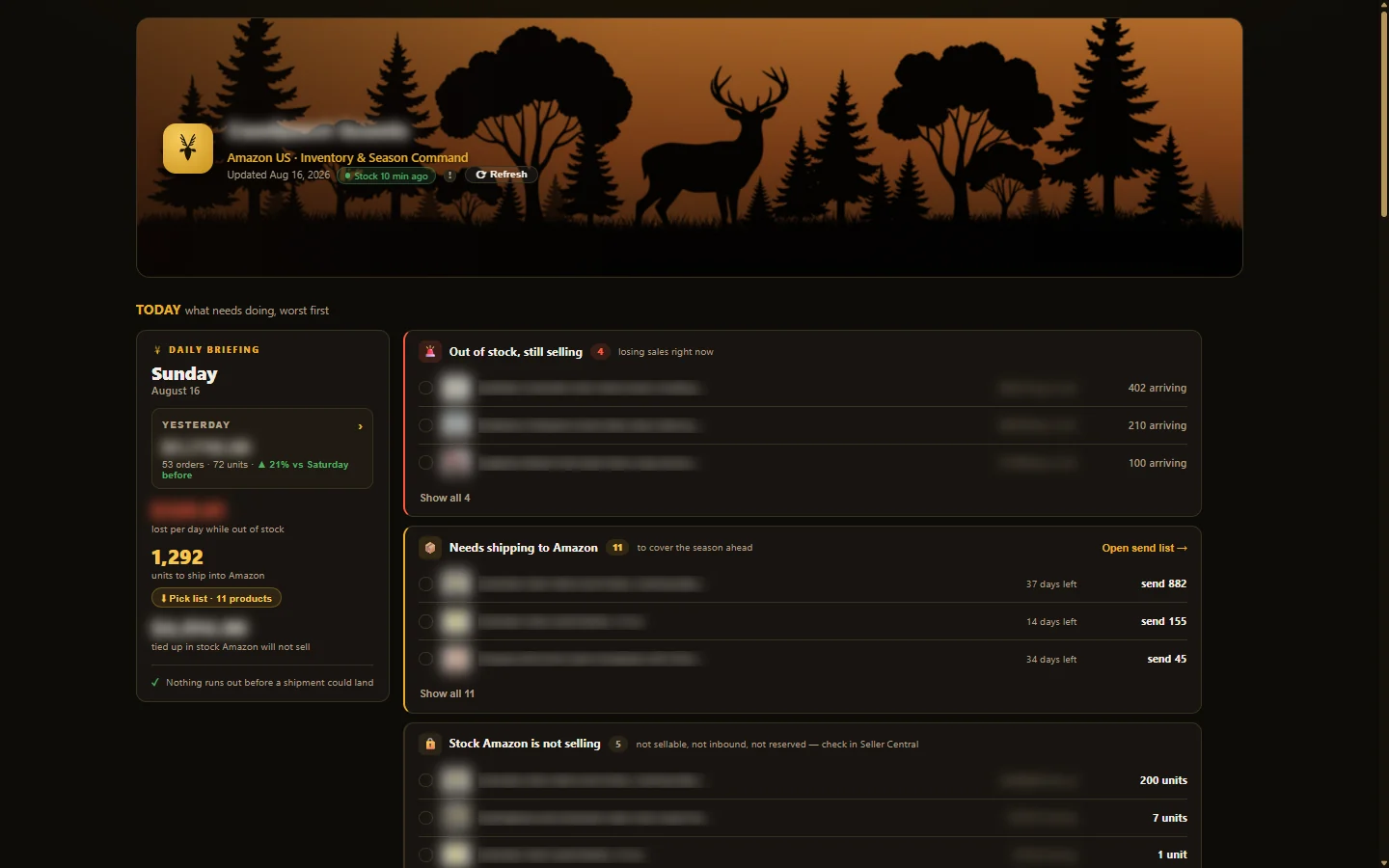
The seller dashboard: a morning briefing panel beside out-of-stock, shipping, and stranded-stock lists
the live dashboard, with brand, product names, and figures blurred for client confidentiality

Seller Central knows everything and tells you nothing first.

The client’s numbers lived in Seller Central: orders in one report, inventory in another, fees in a third. Nothing said which product was out of stock and still selling, or what had to ship this week to survive an October peak that must be ordered for months in advance. Every answer was a manual dig.

A morning briefing, then the season.

The dashboard opens on TODAY, which shows what needs doing, worst first: products out of stock and still selling with the dollars at risk per day, what needs shipping to Amazon and by when, stock Amazon is holding but not selling, and shipments on the way. Below it: season planning against last year’s actuals, a pre-season purchase-order generator, store pulse with daily revenue, and a profit view built from Amazon’s real financial records (fees charged, not estimated).

Amazon SP-APIorders · inventory · finances · pricing01
n8n scheduled jobsrefresh one snapshot on an interval02
Supabase (Postgres)a single snapshot row · read-only to the browser03
React dashboardRecharts · published on Netlify04
Morning briefing & alertswhat needs doing, worst first05
dashboard architecture: scheduled SP-API pulls to one snapshot, one screen

Five decisions behind one calm screen.

01
A snapshot, not a query engine
n8n writes one JSON snapshot to Supabase on a schedule; the dashboard reads a single row. If Supabase is ever unreachable, the app falls back to a bundled copy of the same shape, so the dashboard can never fail to load on the morning the client needs it.
02
Read-only by construction
The browser holds only a publishable key gated by row-level security. The dashboard can read the snapshot and nothing else. There is no write path from the client’s screen to his data.
03
Fresh stock on demand, safely
A “Refresh” button calls a Supabase Edge Function that pulls current stock from Amazon right now. The Amazon credentials live server-side only, and the function patches inventory quantities alone. It cannot touch the sales history.
04
Season-first, not report-first
This is a seasonal business with an October peak, so the dashboard’s real job is ordering ahead: it compares this year’s plan against last year’s actuals, computes what to order per product, and generates a pre-season purchase order. A real PO has already gone out through it.
05
Feedback arrives as video, and gets treated as spec
The client reviews by recording screen-share walkthroughs. Each one is transcribed with timestamps and paired with a frame of exactly what he pointed at. That way “this number here” never gets misread, and every iteration traces back to his own words.

The morning check takes one screen.

In delivery and iterating with the client: the daily briefing replaces the manual dig through Seller Central, re-order alerts fire before stock runs out, and the first pre-season purchase order has already gone to the manufacturer through the dashboard’s own generator. The build continues from the client’s recorded walkthroughs. His words, timestamped, drive each release.

What does your morning check look like?

If it involves five Seller Central tabs and a spreadsheet, tell me what you look for. I’ll show you what one screen of it could look like.